IG_clipboard_paste_merge_ex
In This Topic
This function pastes a rectangular or non-rectangular clipboard image into the HIGEAR image that you specify.
Declaration:
| |
Copy Code
|
AT_ERRCOUNT ACCUAPI IG_clipboard_paste_merge_ex(
        HIGEAR hIGear,
        AT_PIXPOS nLeftPos,
        AT_PIXPOS nTopPos
);
|
Arguments:
| Name |
Type |
Description |
| hIGear |
HIGEAR |
Set to the HIGEAR handle of the image in which to merge the clipboard contents. |
| nLeftPos |
AT_PIXPOS |
X position in HIGEAR image at which to place the upper left corner of the clipboard image when merging. |
| nTopPos |
AT_PIXPOS |
Y position in HIGEAR image at which to place the upper left corner of the clipboard image when merging. |
Return Value:
Returns the number of ImageGear errors that occurred during this function call. If there are no errors, the return value is IGE_SUCCESS.
Supported Raster Image Formats:
Indexed RGB – 1, 4, 8 bpp;
RGB – 24 bpp.
Sample:
Image Processing
Example:
| |
Copy Code
|
AT_ERRCOUNT nErrcount;
HIGEAR  hIGear;
BOOL    bNRpasteAvail;
AT_PIXPOS       xpos, ypos;
AT_MODE         nRegionType;
nErrcount = IG_clipboard_paste_available_ex(&bNRpasteAvail, &nRegionType);
nErrcount = IG_clipboard_paste_merge_ex(hIGear, xpos, ypos);
|
Remarks:
To check if there is a paste-able image on the clipboard, call IG_clipboard_paste_available_ex().
nLeftPos and nTopPos set the (x,y) coordinates of the upper-left corner of the bounding rectangle of the original image. See image below. The image has an (x,y) location within it at which the upper left-corner of the bounding rectangle will be placed. The white circle enclosed within a gray rectangle represents the non-rectangular ROI image stored in the clipboard, where the shaded area represents the transparent area between the bounding rectangle and the non-rectangular ROI. When the clipboard image is merged, only the circle will appear on the image.
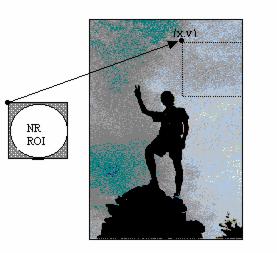
This function will automatically call
IG_clipboard_paste_available_ex() to confirm that there is data available. Therefore, it is not mandatory to call IG_clipboard_paste_available_ex() before making this call, unless you are interested in knowing the type of region contained in the clipboard.
