ART_GUI_property_sheet_create
In This Topic
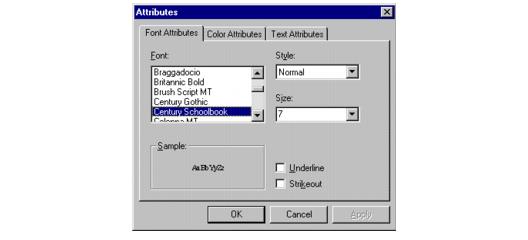
This function creates a "property sheet" - a dialog box that allows you to modify the attributes of a mark object.
Declaration:
| |
Copy Code
|
BOOL FAR PASCAL ART_GUI_property_sheet_create(
        HWND hWndParent,
        const LPAT_DIB lpDIB,
        HARTPROPSHEET FAR* lpPropertySheet
);
|
Arguments:
| Name |
Type |
Description |
| hWndParent |
HWND |
A Windows handle to the Window of the toolbar. |
| lpDIB |
const LPAT_DIB |
A far pointer to the DIB header of underlying image. |
| lpPropertySheet |
HARTPROPSHEET FAR* |
A far pointer that returns an ART handle to the new Property sheet. |
Return Value:
Returns TRUE if a "property sheet" is created successfully, otherwise returns FALSE.
Supported Raster Image Formats:
This function does not process image pixels.
Sample:
Annotation
Example:
| |
Copy Code
|
HIGEAR  hIGear; /* HIGEAR handle of
  image  */
HARTPROPSHEET hPropertySheet; /* handle to the */
/* property sheet */
AT_ERRCOUNT nErrcount;  /* tally of  */
/* ImageGear errors*/
AT_DIB lpDIB;  /* pointer to the */
/* DIB header */
nErrcount = IG_image_DIB_pntr_get(hIGear, &lpDIB);
nErrcount = ART_GUI_property_sheet_create(hWnd, lpDIB,
&hPropertySheet);
|
Remarks:
The screen capture shown below is a property sheet for an Attach-a-Note object. Each type of mark has a different property sheet.