
ImageGear PDF v25.1 - Updated
This topic provides information about the following:
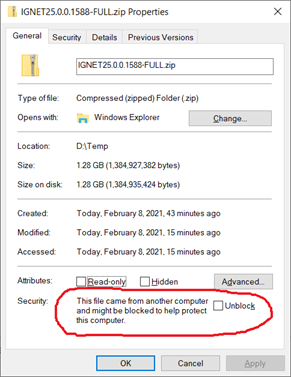
To unpack ImageGear, perform the following steps:
Once extracted, the ImageGear PDF installation zip file has the following directory structure:
| Directory | Description |
|---|---|
| $INSTALLDIR\Bin\x86 | 32-bit assemblies and dependencies. Compiled sample binaries. (Only present in the x86 version.) |
| $INSTALLDIR\Bin\x64 | 64-bit assemblies and dependencies. Compiled sample binaries. (Only present in the x64 version.) |
| $INSTALLDIR\Documentation | Software License Agreement. |
| $INSTALLDIR\Licensing\Deployment | Deployment utility files. |
| $INSTALLDIR\Licensing\LicenseManager | Accusoft License Manager. |
| $INSTALLDIR\Samples | Sample source code. |
| $INSTALLDIR\SchemaDefinitions | XML schema definition for ART annotations. |
Now you can complete one of our step-by-step tutorials to create an ImageGear project or you can explore our robust collection of code samples.